I am posting this link which shows all the major PCLinuxOS repositories list, choose the repository that is closest to you and add it to synaptic and you will get all the updates and packages faster.
Here is the PCLinuxOS Repository List

Wednesday, April 23, 2008


PCLinuxOS Minime 2008 Review
I have made my custom made system from PCLinuxOS Minime 2008 and it works flawlessly on my system.
Here is a great review and discussion thread about PCLinuxOS Minime from Raiden`s Realm.
It`s worth reading for everybody who loves this great GNU/Linux distribution.
Here is a great review and discussion thread about PCLinuxOS Minime from Raiden`s Realm.
It`s worth reading for everybody who loves this great GNU/Linux distribution.
How to reinstall GRUB on PCLinuxOS
Every now and then we install two distributions as dual boot or dual boot Windows with Linux and then we are puzzled how to reinstall GRUB. Below is a simple command line re-installation method of GRUB for PCLinuxOS and which works for any other distribution running GRUB legacy.
Reinstalling GRUB:



g ) Restart you computer. The GRUB bootloader should now appear.
Reinstalling GRUB:
a ) Boot system from PCLinuxOS Live CD
b ) Log in as root
c ) Open a Konsole window, and at the prompt ( [root@home-pc saleem]# ) type;
[root@home-pc saleem]# grub
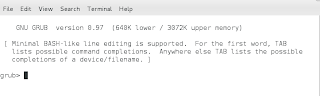
grub> : The grub prompt will appear
d) From the grub prompt type;
grub> find /boot/grub/stage2
(hd0,0)
(hd0,4)
(hd0,5)
(hd0,9)
A list similar to the above one will appear.
e ) You need to know which partition your Linux OS is located. For example it is (hd0,4) thus I type these commands
grub> root (hd0,4)
grub> setup (hd0)
f ) Exit GRUB by typing "quit"
b ) Log in as root
c ) Open a Konsole window, and at the prompt ( [root@home-pc saleem]# ) type;
[root@home-pc saleem]# grub
grub> : The grub prompt will appear
d) From the grub prompt type;
grub> find /boot/grub/stage2
(hd0,0)
(hd0,4)
(hd0,5)
(hd0,9)
A list similar to the above one will appear.
e ) You need to know which partition your Linux OS is located. For example it is (hd0,4) thus I type these commands
grub> root (hd0,4)
grub> setup (hd0)
f ) Exit GRUB by typing "quit"
Some Screenshots here


Subscribe to:
Posts (Atom)